

Learn how to use the X-API-Version header to pin the API version per endpoint and prevent API changes from breaking your implementation.
How versioning works
The API is versioned by date, per endpoint. You pin a date, and every endpoint answers the way it worked on that date. A breaking change then no longer forces you to update your integration on the day we roll it out.
- A version is a publication date. Each version is named after the day it was published, for example
2026-11-27. - Versions apply per endpoint. An endpoint only gets a new version when it has a breaking change. An endpoint without a breaking change answers the same in every version.
- A breaking change is a change that can break an existing integration, such as a field or endpoint that is removed or moved, or a request field that becomes required.
Choosing a version
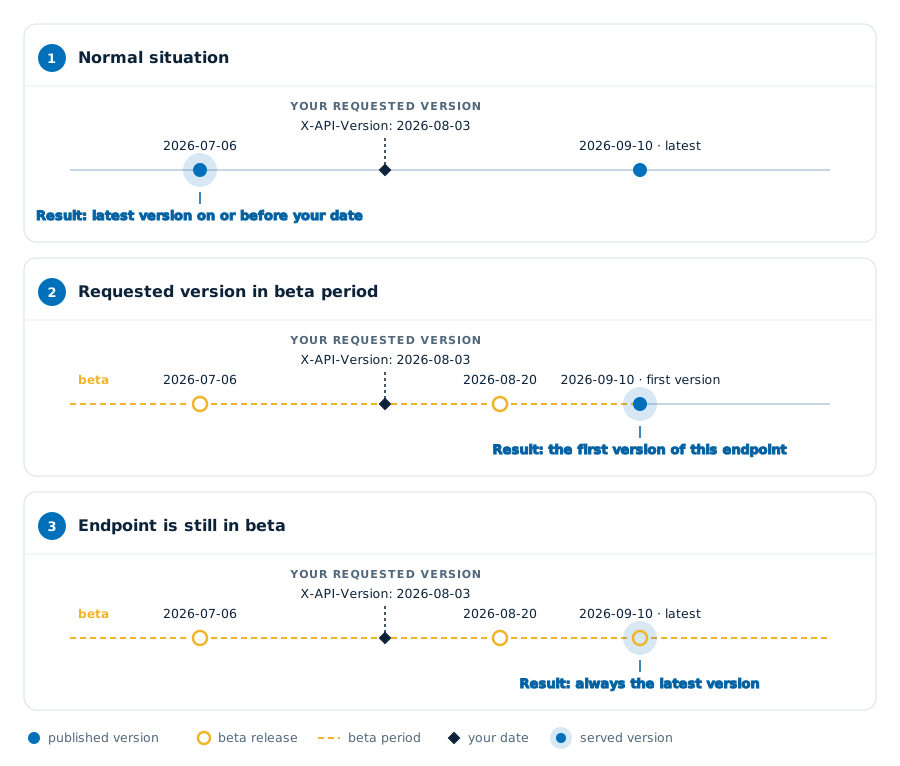
The X-API-Version request header indicates you want a version that was published on or before the given date. The header applies per request, and is supported on every endpoint of the API.
Value of X-API-Version | Value of X-API-Version-Matched |
|---|---|
A date as YYYY-MM-DD, for example 2026-08-03 | The latest version published on or before that date |
latest | The newest version; you are not pinned |
| Header left out | The newest version, as with latest |
| Any other value | A 400 error with code api_version.invalid |
Send the date without quotes and without a time. 2026-08-03T00:00:00, 20260803 and beta are invalid values.
Reading the version
Every response tells you which version handled your request through two headers, error responses included.
| Response header | Meaning |
|---|---|
X-API-Version-Matched | The version that handled your request, or beta for an endpoint in beta |
X-API-Version-Latest | The newest version of the API |
If X-API-Version-Matched matches X-API-Version-Latest, you are on the newest API. If not, a newer version exists, and the version history shows what changed.
An invalid value in X-API-Version only returns X-API-Version-Latest, because no version was chosen. Both headers are exposed through CORS, so integrations running in a browser can read them.
Beta and endpoints released later
The date you send does not always give you a pinned version. Two cases work differently:
- The endpoint is in beta. An endpoint in beta always answers with the newest version, whatever date you send.
X-API-Version-Matchedthen returnsbeta. You cannot pin a beta endpoint, and a breaking change applies to every request at once. In the API reference, such an endpoint has "(BETA)" after its name. - Your date is before the endpoint's first version. This happens when the endpoint became available, or left beta, after your date. You then get the endpoint's first released version, and
X-API-Version-Matchednames that date.
While the whole API is in beta, X-API-Version-Matched and X-API-Version-Latest return beta on every endpoint and a date has no effect yet.
Examples
Pinning a version. The request pins August 3rd, 2026. The endpoint got a new version on July 6th, and another one on September 10th.
GET /mixed-broadband/connections/ HTTP/1.1
X-API-Version: 2026-08-03HTTP/1.1 200 OK
X-API-Version-Matched: 2026-07-06
X-API-Version-Latest: 2026-09-10Your request is handled the way the endpoint worked on August 3rd, even though a newer version exists. Had the endpoint got a new version on August 3rd itself, you would get that version.
An endpoint in beta. The date has no effect; the endpoint answers with the newest version.
HTTP/1.1 200 OK
X-API-Version-Matched: beta
X-API-Version-Latest: 2026-09-10
An invalid value. A date with a time is rejected.
GET /mixed-broadband/connections/ HTTP/1.1
X-API-Version: 2026-08-03T00:00:00HTTP/1.1 400 Bad Request
X-API-Version-Latest: 2026-09-10Recommended practice
In production, send a fixed date in X-API-Version and move it yourself, at a time that suits you.
- Pin the date you tested your integration on. Send that date with every request.
- Watch
X-API-Version-Latest. When it differs fromX-API-Version-Matched, log or alert on it; a newer version exists. - Read in the version history what changed. It lists, per version, which endpoints had a breaking change.
- Test with the new date, then move your pin. Update your integration where needed, then send the new date in
X-API-Version.
You cannot pin endpoints in beta. Follow the changelog for those endpoints, because their breaking changes apply at once.
Version history
This lists, per version, which endpoints had a breaking change. You can pin every version in this list with X-API-Version, except for endpoints in beta.
| Version | Announced | Impact | Breaking change |
|---|---|---|---|
beta | 2026/11/3 | All connection endpoints. See: Circuit-profile-change.pdf | The circuit profile moves from circuits[].termination.profile to circuits[].profile. Because these endpoints are in beta, the change applies to every request. See the change document. |